
AI-Powered Project Management Software Plexo for Predictable Schedules, Projects That Keep Promises
Describe your feature and let AI break it down into actionable tasks with estimated hours, priorities, and categories — in seconds. Work together in real‑time and keep descriptions, comments, and attachments organized in one place.
Trusted by teams worldwide
To Do
3Login Screen Development
P1Database Design
P2API Documentation
P3In Progress
2User Authentication Implementation
P1UI Component Development
P2Done
3Project Planning Document
P1Environment Setup
P2Test Plan Development
P3Powerful Features
Everything You Need from Project Management Software
Real-time collaborative WBS, resource calendar-based timeline prediction, MS Project alternative. Maximize your team productivity with comprehensive tools designed for modern project management
AI Task Breakdown
Describe a feature in plain text and AI automatically generates a structured WBS with categories, tasks, time estimates, and priorities.
3-Level WBS Structure
Organize tasks with a 3-level hierarchy: two category levels and tasks beneath them.
Real-time Collaboration
Edit together in real‑time. Everyone stays on the same page while key details remain safe and organized.
Project Management
Manage multiple projects systematically and organize them into portfolios.
Resource Calendar
Plan daily resource allocation and visualize team workload.
Smart Analytics
Analyze projects with statistics by assignee, priority, difficulty, status, and burndown charts.
Excel Integration
Open imports instantly and export to CSV whenever you need.
Organization Settings
Set national holidays, company-specific holidays, work start day, and standard working hours that apply to all projects.
Issue Tracker Integration
Track tasks by integrating with external issue management systems like Jira and GitHub.
GitHub Integration
Link commits and pull requests to tasks automatically. Track development progress directly in your project timeline.
Multi-language Support
Support for Korean and English with a multilingual environment for global teams.
Brand Story
What is Plexo?
Plexo combines "Plan" and "Plexus (neural network/connection)". It manages complex structures of projects, tasks, people, and schedules by connecting them clearly like a neural network.
Core of project planning & management
Meaning neural network/connection
An organically connected network of plans
Roadmap
Evolving Project Management Platform
Starting with WBS management, evolving into a comprehensive project management platform
Stage 1: WBS Management
Real-time collaboration, resource calendar, analytics
Stage 2: Kanban & Agile
Kanban board, Sprints, Backlog
Stage 3: Gantt Chart
Interactive timeline, task dependencies, critical path, resource-aware scheduling
Stage 4: AI-Powered Planning
AI task breakdown, intelligent estimation, smart categorization
Stage 5: Risk Management
Risk identification, assessment, response, auto-detection
Stage 6: Reports & Communication
✅ Daily reports | 📅 Custom reports | 📅 Integrations
How AI Task Breakdown Works
Transform feature descriptions into actionable WBS tasks in 3 simple steps
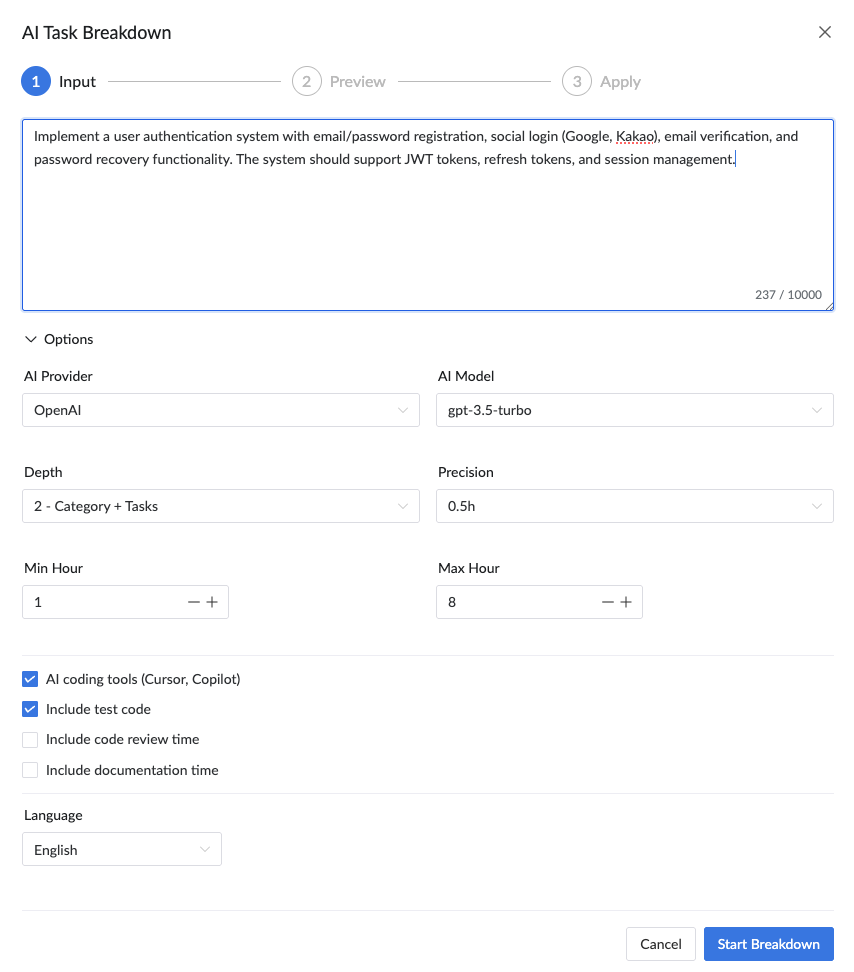
Step 1: Describe Your Feature
Write a brief description of the feature you want to build. AI analyzes your input and understands the scope.
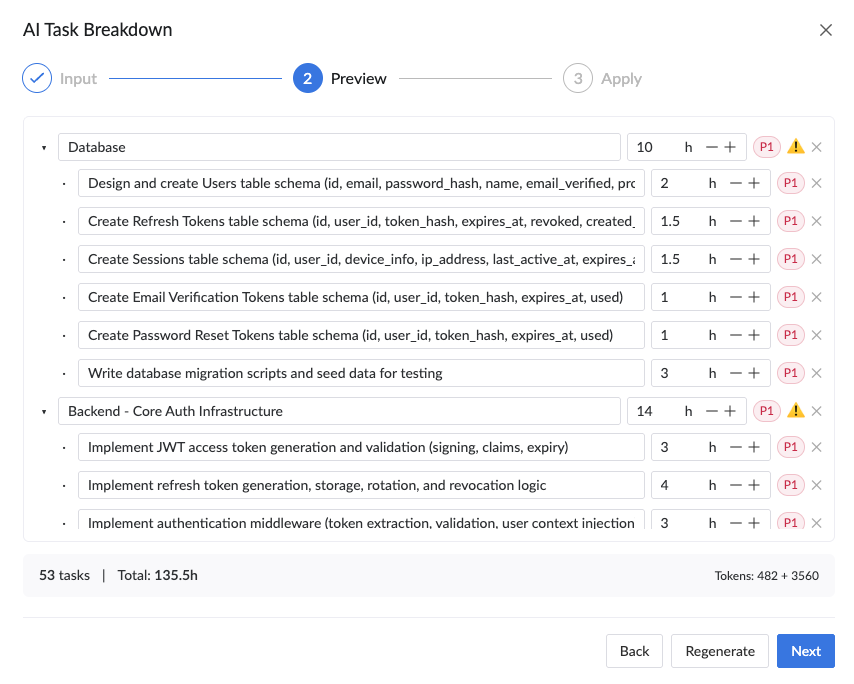
Step 2: AI Generates Tasks
AI automatically breaks down your feature into structured tasks with categories, time estimates, priorities, and difficulty levels.
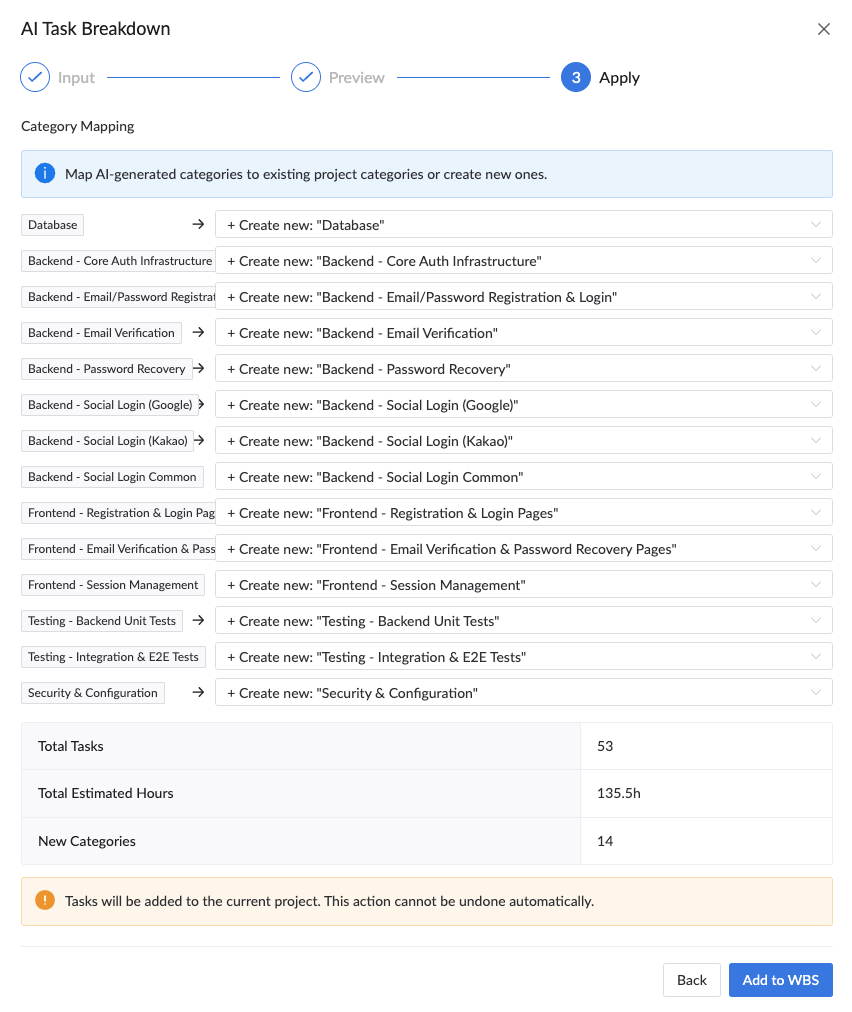
Step 3: Review & Apply
Review the generated tasks, map categories to your project, and add them to your WBS with one click.
Get Started Today
Start for free and revolutionize your team productivity
Have questions?
Email us: support@plexo.work